
 blog
blog
Best Mesh WiFi for Rural Properties: 2026 Guide
Table of Contents
- What Makes Mesh WiFi Work on Rural Properties
- Quick Comparison: Top Mesh WiFi Systems for Rural Coverage
- How to Extend WiFi to a Detached Garage or Barn
- Mesh WiFi with Ethernet Backhaul: Why Wired Beats Wireless for Rural Nodes
- Outdoor Rated Mesh Nodes: Durability and Environmental Protection
- Multi-Story and Large Home Optimization
- Compatibility with Satellite Internet Providers
- Conclusion
- Frequently Asked Questions
Last Updated: September 29, 2026
What Makes Mesh WiFi Work on Rural Properties
The best mesh WiFi for rural properties solves what standard routers cannot: covering long distances across open land without losing signal to outbuildings, tree lines, or elevation changes. NewDay Tech has over 15 years of industry experience designing connectivity for homes and ranches where a single router never stood a chance.
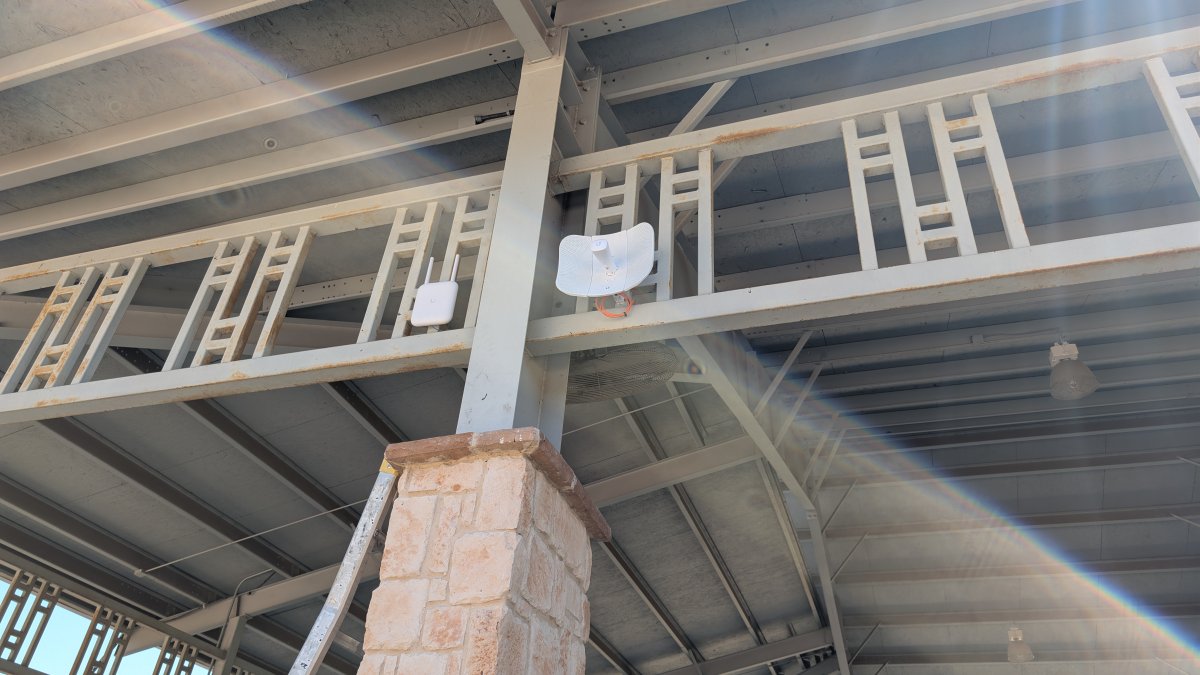
Rural homeowner checking the best mesh WiFi for rural properties on a farmhouse wall
Tri-Band vs Dual-Band: Which Handles Distance Better
Tri-band systems add a dedicated backhaul radio, so nodes talk to each other on a separate channel instead of competing with your devices. Over long node-to-node distances, that reduces congestion and keeps throughput steadier.
Key Specs That Matter: Throughput, Latency, and Signal Propagation
Three numbers decide rural performance:
- Throughput: the data transfer rate between nodes and devices
- Latency and jitter: delay and its variation, which matter for calls and cameras
- Signal propagation: how well radio waves push through distance and obstacles
Beamforming and MU-MIMO direct signal where devices actually sit, and OFDMA improves efficiency when many devices share the network. These matter more on rural properties than raw top speed.
Quick Comparison: Top Mesh WiFi Systems for Rural Coverage
Rural buyers should sort mesh systems by how they move data between nodes, not by the marketing coverage number on the box, especially when nodes sit 100 to 300 feet apart.
System Type | Backhaul | Typical Node-to-Node Range | Best For | Outdoor Support |
|---|---|---|---|---|
Dual-band mesh | Wireless (shared with clients) | 30-50 ft through walls | Small homes, close nodes | Limited |
Tri-band mesh | Wireless (dedicated 5 GHz or 6 GHz radio) | 50-80 ft through walls | Large homes, multi-story | Add-on outdoor nodes |
Tri-band + wired backhaul | Ethernet (Cat5e/Cat6) | Up to 328 ft per run | Ranches, outbuildings | Full support |
Mesh + point-to-point bridge | Dedicated 60 GHz or 5 GHz link | 300 ft to several miles line-of-sight | Detached barns, shops, gates | Full support |
How We Evaluated These Systems
We weighed four factors: coverage radius per node, backhaul options, outdoor durability, and handling of limited rural bandwidth. Systems that only work indoors or need nodes packed close together scored lower.
What the Spec Sheet Won't Tell You
Three numbers on a retail box mislead rural buyers most:
- "Up to X,000 sq ft" coverage. That figure assumes open floor plan, wood-frame walls, and nodes no more than one room apart. Through a metal-sided barn or stone farmhouse wall, expect 30-50% of the rated radius.
- AXE/AX/AC speed ratings. The top-line number is the sum of all radios, not what any single device sees. A rural client on a 25 Mbps satellite link will never touch it.
- "Works with any ISP." True for the WAN port, but not for double-NAT, CGNAT, or satellite modems that lock you out of bridge mode. Check that before you buy.
Bandwidth Management for Limited Rural Connections
Most rural properties run on a connection slower than the mesh system itself, DSL, fixed wireless, or satellite. When the uplink is the bottleneck, the mesh hardware's job shifts from "move more data" to "move the right data first."
- Enable adaptive QoS or SQM on the primary node if the firmware offers it. This smooths bufferbloat, which is the main reason rural calls sound choppy even when speed tests look fine.
- Set device priorities by category, not by device. Prioritize video conferencing, VoIP, and camera uploads; deprioritize streaming sticks, game consoles, and background backups.
- Cap guest network bandwidth so a visitor's phone update doesn't take down the house.
- Schedule large downloads (OS updates, cloud backups) for overnight windows when nobody is on a call.
Match the System to Your Uplink, Not the Other Way Around
A tri-band Wi-Fi 6E system on a 10 Mbps DSL line is wasted money; the same system on a 200 Mbps fixed-wireless link is a reasonable investment. Before comparing kits, know three things:
- Measured upload speed, not the advertised plan. Upload is what breaks video calls and camera feeds.
- Latency under load. Run a bufferbloat test while someone else streams; if latency triples, QoS matters more than throughput.
- Data cap. Some rural plans throttle after a set monthly volume. A mesh system that aggressively retries failed packets can burn through a cap faster than a single router.
How to Extend WiFi to a Detached Garage or Barn
Extending WiFi to a detached garage or barn comes down to one question: can you run a cable? If yes, wired ethernet is always better. If no, you have two wireless options.
Point-to-Point Wireless Bridges for Outbuildings
A point-to-point bridge is a pair of radios creating a dedicated link between two buildings, one on the house, one on the barn, aimed at each other.
Mesh WiFi with Ethernet Backhaul: Why Wired Beats Wireless for Rural Nodes
Mesh WiFi with ethernet backhaul means each node connects through a cable instead of a wireless link, giving lower latency, higher throughput, and no interference between nodes.
Outdoor Rated Mesh Nodes: Durability and Environmental Protection
Outdoor rated mesh nodes survive weather, temperature swings, and dust. A node on a fence post or under an eave needs a proper outdoor enclosure, not an indoor unit in a plastic bag.
Power Stability and Surge Protection for Remote Installations
Remote nodes often sit far from the main panel, which makes power stability a real concern. Voltage dips and surges damage hardware over time.
A few practical safeguards:
- Install a surge protector at each outdoor node
- Use a UPS on the main router and any critical switch
- Check grounding on outbuilding circuits
- Add a PoE injector with surge protection for powered nodes
Multi-Story and Large Home Optimization
Rural homes rarely match the suburban two-story template most mesh guides assume. A farmhouse with a detached addition, a 3,000-square-foot ranch, and a metal-roofed barndominium each break placement rules differently. The goal is the same: keep every node within one solid wall or one open span of the next, and keep the backhaul path short.
Node Placement by Home Shape
- Two-story farmhouse. Place one node on each floor, but stagger them horizontally, not stacked in the same corner. Stacked nodes create a vertical cone of strong signal and dead corners on both floors.
- Long single-story ranch. Nodes every 35-45 feet along the length of the house, alternating sides of the central hallway. A single node in the middle will not reach both ends through interior walls.
- Home with a detached wing or addition. Treat the addition as a separate zone. If you can run one Ethernet cable through the connecting wall, do it, a wired node in the addition beats any wireless hop through exterior sheathing.
- Metal roof or metal siding. Radio waves reflect off metal rather than passing through it. Nodes must be inside the same metal envelope as the devices they serve, or outside looking in through a window or wood-framed opening.
Backhaul Choices for Large Footprints
Wired Ethernet between floors and wings is the biggest upgrade for a large rural home, Cat6 handles 1 Gbps to 328 feet, covering most interior runs. Where cable is impossible:
- MoCA over existing coax works if the house already has cable TV wiring, often true in older farmhouses.
- Powerline adapters are a last resort. They work on the same circuit but degrade badly across sub-panels, which rural properties often have.
- Tri-band wireless backhaul is the fallback. A dedicated 6 GHz backhaul radio holds throughput better than a shared 5 GHz channel, but it still loses range through every wall.
Roaming That Actually Works
A mesh system that doesn't hand off cleanly is just several routers with the same name. Three settings matter:
- 802.11k/v/r (often labeled "fast roaming" or "seamless roaming") should be enabled on every node. Without it, a phone clings to a distant node until the signal drops entirely.
- Minimum RSSI (if the firmware exposes it) tells a node to kick a client once the signal falls below a threshold, forcing a handoff. Set it around -70 dBm as a starting point and adjust.
- Band steering pushes capable devices to 5 GHz or 6 GHz, freeing 2.4 GHz for the long-range devices, cameras, smart plugs, and older equipment, that need it.
Vertical vs. Horizontal Coverage
A node's antenna pattern is roughly donut-shaped: strong outward, weak above and below. In a multi-story home, a ceiling-mounted first-floor node serves its own floor well and the floor above poorly. Mount nodes on walls or shelves at mid-height, and aim for overlap between floors rather than direct stacking.
When to Stop Adding Nodes
More nodes are not always better, each wireless hop adds latency and consumes backhaul airtime. On a slow rural uplink, a five-node wireless mesh can perform worse than a three-node system with one wired run. Add a node only for a measured dead spot, not because the box says the kit supports more.
Compatibility with Satellite Internet Providers
Satellite internet works with mesh WiFi, but the setup needs care: the dish feeds a router or modem, and your mesh system connects to that as its uplink.
Two things to watch:
- Bandwidth management: satellite connections have limited capacity and higher latency. QoS settings that prioritize video calls and cameras keep the important traffic moving.
- Double NAT issues: some satellite setups create a second network layer that blocks remote access. Bridging the satellite router or adjusting settings fixes this.
FCC Consumer Guide on broadband and satellite service
Conclusion
Rural connectivity rewards planning over guesswork. The right mesh system, with wired backhaul where possible and surge protection everywhere, keeps a property connected from the house to the far fence line.
Frequently Asked Questions
What are the downsides of mesh WiFi for rural properties?
Mesh WiFi systems can lose signal strength over long distances between nodes, especially through trees, barn walls, and metal siding. Latency may increase with each wireless hop, and throughput drops if the backhaul is not wired. Power stability is another concern in remote areas; surges can damage nodes without proper protection. Many rural users find that a hybrid approach with Ethernet backhaul or point-to-point bridges solves these issues.
How many mesh nodes do I need for a 3000 sq ft house on a rural property?
For a 3000 sq ft home with typical rural construction, two to three mesh nodes usually provide full coverage. Place one node near the satellite modem or main router, and space others to cover dead zones. If you have outbuildings, add outdoor-rated nodes or a wireless bridge. Every property differs; a site survey helps determine the exact count. NewDay Tech can design a layout for your specific acreage.
Can mesh WiFi systems connect a house to a detached barn?
Yes, but the connection method matters. Wireless mesh can reach a barn if the distance is under 150 feet and obstructions are minimal. For greater distances or through trees and metal structures, use a point-to-point wireless bridge or bury Ethernet cable for a wired backhaul. Outdoor-rated mesh nodes at both ends improve reliability. This setup ensures your barn cameras, VoIP, and sensors stay online.
Do I need a wired backhaul for rural property coverage?
Wired backhaul is not always required, but it significantly improves performance. Ethernet backhaul reduces latency, increases throughput, and eliminates interference between nodes. For rural properties with multiple buildings, running cable or using a wireless bridge for backhaul is often the best approach. If wiring is impractical, tri-band mesh systems with a dedicated backhaul radio can work well. A professional installer can recommend the right option.