
 ultimate-guide
Cost of Professional Home Technology Integration
Table of Contents
- What Drives the Cost of Professional Home Technology Integration Services
- Smart Home Installation Labor Rates and What They Cover
- How to Eliminate Wi-Fi Dead Zones Across Your Property
- Home Automation System Maintenance Costs and Service Agreements
- DIY vs. Professional Installation: Where the Money Actually Goes
- Hidden Costs of Retrofitting vs. New Construction
- Total Cost of Ownership Over 5-10 Years
- Frequently Asked Questions
Last Updated: October 1, 2026
What Drives the Cost of Professional Home Technology Integration Services
The cost of professional home technology integration services comes down to three variables: hardware, labor, and programming. Most quotes that look wildly different are pricing different scopes, not the same job.
Hardware Procurement vs. Labor and Programming Fees
Hardware is the easiest line item to compare and the least useful on its own. Hubs, cameras, access points, and audio gear carry published retail prices, so homeowners anchor on that number.
Project Scope: Single Room vs. Whole-Property Systems
Scope determines nearly everything else. A single-room setup (one TV, one access point, a few smart lights) is a same-day job. A whole-property system spanning a main house, outbuildings, and outdoor surveillance is a multi-week project with planning, pre-wire, and commissioning phases. Room-by-room designs hit a ceiling fast; property-wide designs cost more upfront and less over time.
| Scope | Typical Timeline | What It Includes |
|---|---|---|
| Single room | 1 day | One access point, basic control, minimal wiring |
| Multi-room | 2-5 days | Smart lighting, climate control, multi-room audio |
| Whole property | 1-3 weeks | Network infrastructure, security surveillance, centralized control |
Smart Home Installation Labor Rates and What They Cover
Smart home installation labor rates are usually billed hourly or per project, and cover more than the physical install: technical expertise, system architecture planning, and troubleshooting.
Low-Voltage Wiring and Network Infrastructure
Low-voltage wiring is the backbone of any reliable system and the line item homeowners most often underestimate. Pulling cable through finished walls, attics, and outbuildings takes time, and retrofits cost more than new construction because someone has to open and close the path.
How to Eliminate Wi-Fi Dead Zones Across Your Property
To eliminate Wi-Fi dead zones, you need wired access points placed where coverage actually drops, not a single router with a booster. Boosters repeat a weak signal; cabled access points create new coverage.
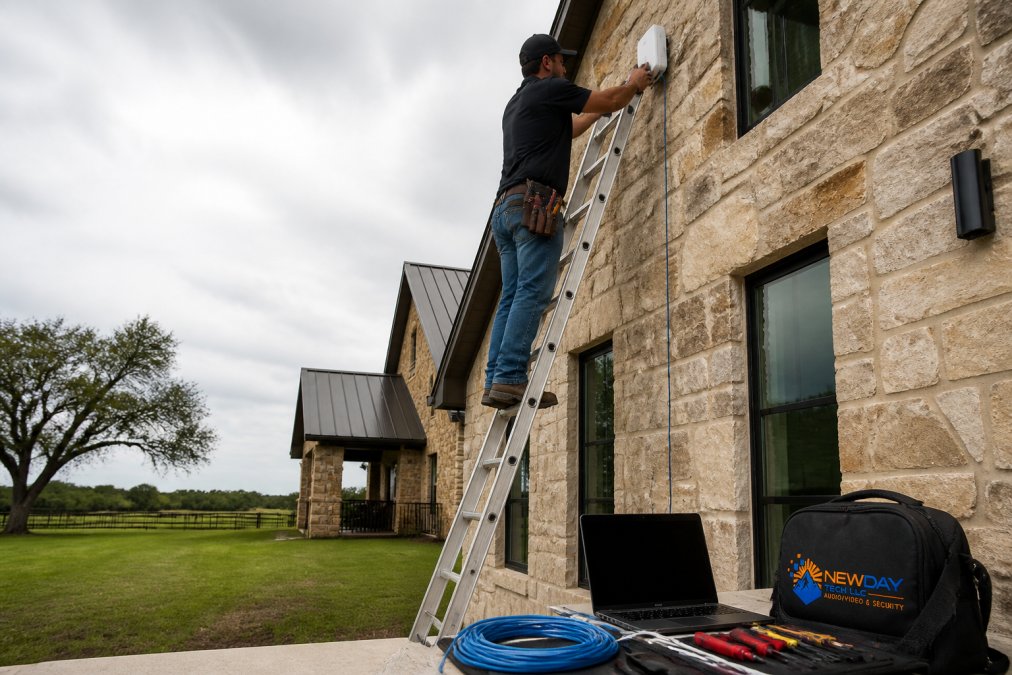
The process looks like this:
- Map coverage with a site survey to find real dead zones
- Run low-voltage cable to each access point location
- Mount and connect access points to a central switch
- Configure the network so devices roam between points without dropping
- Test signal strength in every room and outdoor area
Home Automation System Maintenance Costs and Service Agreements
Home automation system maintenance costs are the line item most quotes leave out entirely. Hardware fails, firmware updates change behavior, and an unmaintained system slowly stops working the way it did on day one. The gap between a system that still runs cleanly in year five and a pile of half-working apps is almost always a service agreement.
What a Service Agreement Actually Covers
Most agreements fall into three tiers, and the differences matter more than the price:
- Remote-only: monitoring, firmware pushes, and phone/remote troubleshooting. Lowest monthly cost, no truck rolls included.
- Remote plus scheduled visits: adds one or two preventive on-site visits per year for testing, cleaning, and firmware verification on devices that need physical access.
- Full managed service: adds priority response windows, loaner hardware during repairs, and coverage for configuration changes when you add devices or remodel.
Remote Monitoring, Firmware Updates, and Troubleshooting
Remote monitoring is the highest-value part of most agreements because it is proactive. A monitored system flags a camera that stopped recording or an access point that dropped offline, often before the homeowner notices. Without it, you find out when you pull up footage and there is nothing there.
The Cost of Skipping Maintenance
The real cost of no agreement is not the repair bill, it is the compounding drift. A camera goes offline unnoticed for months. A firmware update breaks a scene and the homeowner stops using it. An access point degrades and a corner of the house quietly loses coverage. By the time someone calls, the fix is a project, not a ticket.
Cybersecurity and Network Hardening as a Service Line
This is the part most guides skip entirely, and it is the fastest-growing line item in professional integration. A professionally integrated home is a small network with dozens of internet-connected devices, cameras, locks, thermostats, speakers, hubs, and the control system itself. Every one is an attack surface, and consumer-grade routers do not segment them.
Network hardening under a service agreement typically includes:
- Network segmentation: putting cameras, IoT devices, and personal computers on separate VLANs so a compromised device cannot reach your laptop or your file storage.
- Firmware and credential management: rotating default passwords, disabling unused services, and keeping router and access point firmware current.
- Remote-access controls: replacing open port forwarding with a VPN or a managed tunnel so you can reach your system without exposing it to the public internet.
- Guest network isolation: keeping visitors and their devices off the network your cameras and control system live on.
- Monitoring and alerts: flagging new devices joining the network, repeated failed logins, and outbound traffic from devices that should not be talking to the internet.
DIY vs. Professional Installation: Where the Money Actually Goes
DIY saves money on labor and costs money on mistakes. If you enjoy the work and your property is simple, DIY can work. If your setup spans multiple buildings, security, and remote access, the savings rarely hold.
- Consultation and design: planning system architecture before buying anything
- Hardware procurement: sourcing compatible devices, often at better pricing than retail
- Installation labor: wiring, mounting, and physical setup
- Programming: configuration, automation protocols, and centralized control
- Project management: coordinating trades, timelines, and testing
- Support: what happens after the install
What DIY Actually Costs You
The sticker price of a DIY build looks lower because it only counts hardware. The real comparison includes the costs DIY pushes onto you:
- Time. A whole-property pre-wire and configuration is a multi-week project for a professional crew. As a first-timer, expect multiples of that, spread across evenings and weekends.
- Mistakes that require rework. Fishing cable through the wrong stud bay, mounting an access point where it cannot reach the switch, or buying a hub that does not speak the protocol your locks use, each means buying hardware twice and opening the same wall twice.
- Tool and material purchases. Cable testers, crimpers, fish tape, low-voltage boxes, patch panels, and the cable itself add up fast, and most of it you will use once.
- Programming time. Scenes, automations, user interfaces, and remote access are not plug-and-play. This is the single largest hidden cost in a DIY build, and the part most homeowners underestimate.
- No warranty on the system as a whole. Manufacturer warranties cover individual devices. Nobody warranties that the devices work together.
The Failure Modes DIY Hits Most Often
A common pattern in DIY builds is not a single dramatic failure, it is a slow accumulation of small ones:
- Protocol mismatch. Devices from different ecosystems that each work alone but cannot trigger each other.
- Weak network foundation. A single consumer router trying to carry dozens of devices, cameras, and streams. Everything works until it doesn't.
- No remote access strategy. Port forwarding set up once and never revisited, leaving the system exposed.
- No backup or recovery plan. When the hub dies, the automations die with it and there is no configuration backup to restore.
- No one to call. When something breaks six months in, the homeowner becomes the integrator, on their own time, with no documentation of how the system was originally built.
The Cybersecurity Gap in DIY Builds
This is where DIY and professional diverge the most. A professionally integrated home is a small network with dozens of internet-connected devices. Every one is an attack surface, and consumer routers do not segment them.
When DIY Is the Right Call
DIY is reasonable when the scope is genuinely small: a handful of smart plugs and bulbs, a single streaming setup, a video doorbell on an existing circuit. Mistakes are cheap to fix and there is no coordination problem to solve.
Hidden Costs of Retrofitting vs. New Construction
Retrofitting costs more than pre-wiring during construction, and the gap is bigger than most homeowners expect. In new construction, cable runs happen before drywall, so labor is fast and clean. In a retrofit, every run means fishing cable through finished space.
The hidden costs of retrofitting include:
- Drywall repair and repainting after cable runs
- Longer labor hours for the same result
- Compromises on access point placement when walls are closed
- Upgraded hardware to compensate for placement you can't change
Total Cost of Ownership Over 5-10 Years
Energy savings ROI is the other side of this equation. Smart climate control and lighting schedules reduce waste, and those savings accumulate. The ROI is real but modest per device; it shows up at the system level, not the gadget level.
Frequently Asked Questions
How much does a home automation system cost?
The cost of professional home technology integration depends on the size of your property, the number of systems you want connected, and whether the home is pre-wired or needs retrofitting. Hardware, labor, and programming fees are typically quoted separately. For a specific estimate based on your property, request a consultation with NewDay Tech, who can assess your needs and provide a detailed breakdown.
What factors influence the price of home technology integration?
Key factors include the number of rooms and devices, whether low-voltage wiring already exists, the complexity of the system architecture, and whether you need centralized control across multiple systems like smart lighting, climate control, and security surveillance. Remote or rural properties may also require additional network infrastructure such as Starlink installation. Labor rates and programming time vary based on the technical expertise required and the level of customization.
Are there ongoing maintenance fees for integrated smart home systems?
Yes, most professionally integrated systems include ongoing service agreements that cover remote monitoring, firmware updates, troubleshooting, and system reliability checks. These maintenance contracts are separate from the initial installation cost and are typically billed monthly or annually. NewDay Tech offers ongoing support plans designed to keep your system running smoothly long after the install is complete. Check their website for current service plan options.
What is the difference between DIY smart home setups and professional integration?
DIY setups often result in device compatibility issues, multiple apps, and Wi-Fi dead zones that undermine system reliability. Professional integration handles the entire process, from system architecture and low-voltage wiring to configuration and user interface design. A professional team ensures interoperability between devices, provides centralized control, and offers ongoing support. While DIY may cost less upfront, professional integration typically reduces long-term troubleshooting and replacement costs.